TDD in the AI Era


Barry S. Stahl

Solution Architect & Developer

Microsoft .NET MVP

Physics & Math Nerd

@bsstahl@cognitiveinheritance.com

https://CognitiveInheritance.com

Transparent Half Width Image 960x800.png

Favorite Physicists & Mathematicians

Favorite Physicists

  1. Harold "Hal" Stahl
  2. Carl Sagan
  3. Richard Feynman
  4. Marie Curie
  5. Nikola Tesla
  6. Albert Einstein
  7. Neil Degrasse Tyson
  8. Niels Bohr
  9. Galileo Galilei
  10. Michael Faraday

Other notables: Stephen Hawking, Edwin Hubble, Leonard Susskind, Christiaan Huygens

Favorite Mathematicians

  1. Ada Lovelace
  2. Alan Turing
  3. Johannes Kepler
  4. Rene Descartes
  5. Isaac Newton
  6. Emmy Noether
  7. George Boole
  8. Blaise Pascal
  9. Johann Gauss
  10. Grace Hopper

Other notables: Daphne Koller, Grady Booch, Leonardo Fibonacci, Evelyn Berezin, Benoit Mandelbrot

Fediverse Supporter

Logos.png

Some OSS Projects I Run

  1. Liquid Victor : Media tracking and aggregation [used to assemble this presentation]
  2. Prehensile Pony-Tail : A static site generator built in c#
  3. TestHelperExtensions : A set of extension methods helpful when building unit tests
  4. Conference Scheduler : A conference schedule optimizer
  5. IntentBot : A microservices framework for creating conversational bots on top of Bot Framework
  6. LiquidNun : Library of abstractions and implementations for loosely-coupled applications
  7. Toastmasters Agenda : A c# library and website for generating agenda's for Toastmasters meetings
  8. ProtoBuf Data Mapper : A c# library for mapping and transforming ProtoBuf messages

http://GiveCamp.org

GiveCamp.png

Achievement Unlocked

bss-100-achievement-unlocked-1024x250.png

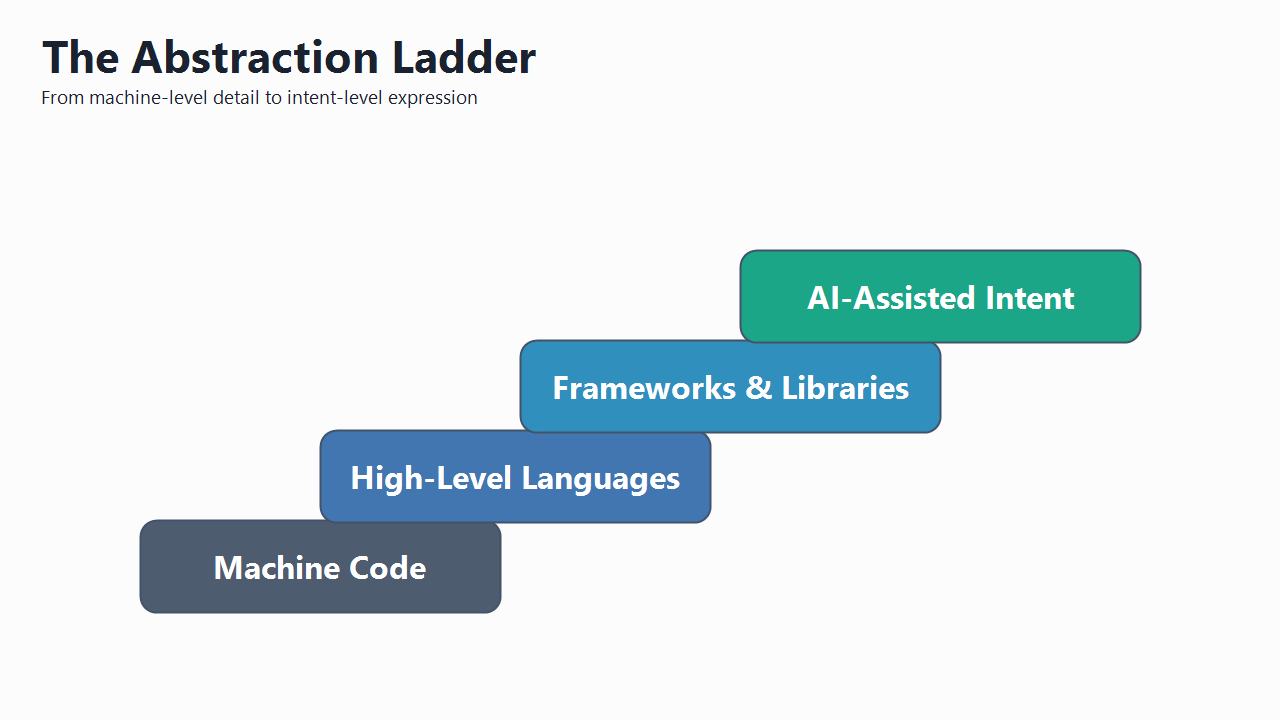
The Abstraction Ladder

  • Machine code
    • Exact instructions the hardware executes.
      • Maximum precision
  • High-level languages
    • Express logic in readable source code.
      • Explicit control flow & data structures
  • Frameworks and libraries
    • Reusable abstractions and patterns.
      • Accelerate implementation and consistency.
  • AI-assisted intent
    • Describe outcomes, constraints, & behavior.
      • Tools synthesize structure.
Abstraction-Ladder-Steps.png

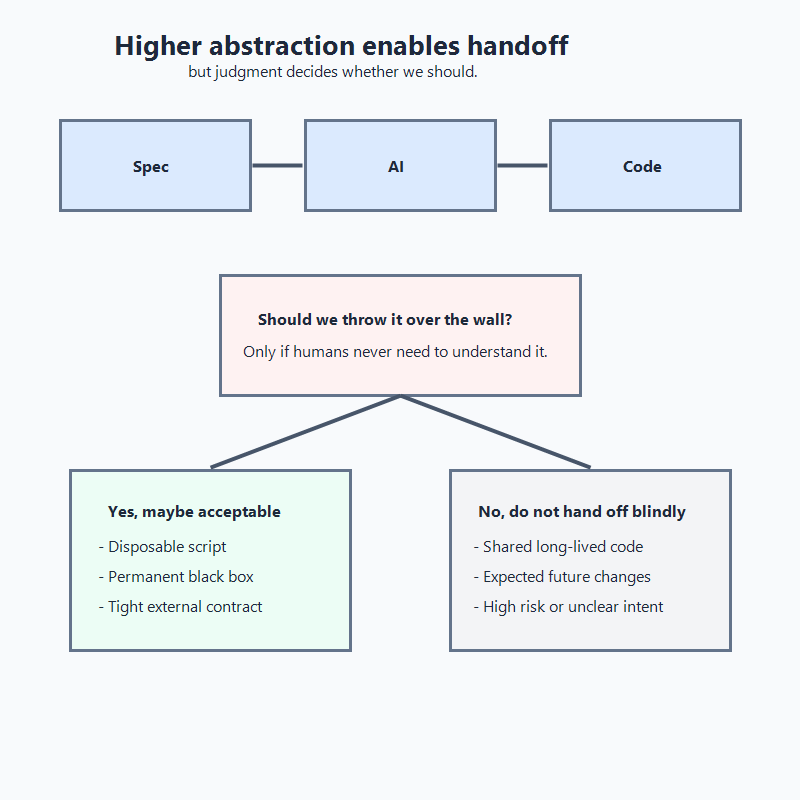
Judgement Required

  • We can delegate implementation now
    • A strong spec can be thrown over the wall and AI may produce plausible code.
  • Capability is not permission
    • The decision is not "can we"; it is "should we in this context".
  • Use over-the-wall only with strict boundaries
    • Disposable code or permanently black-boxed services with stable contracts.
  • Otherwise keep humans in the loop
    • Shared, long-lived, or high-risk code needs human-readable intent and design.
Spec-Over-Wall-Caution.png

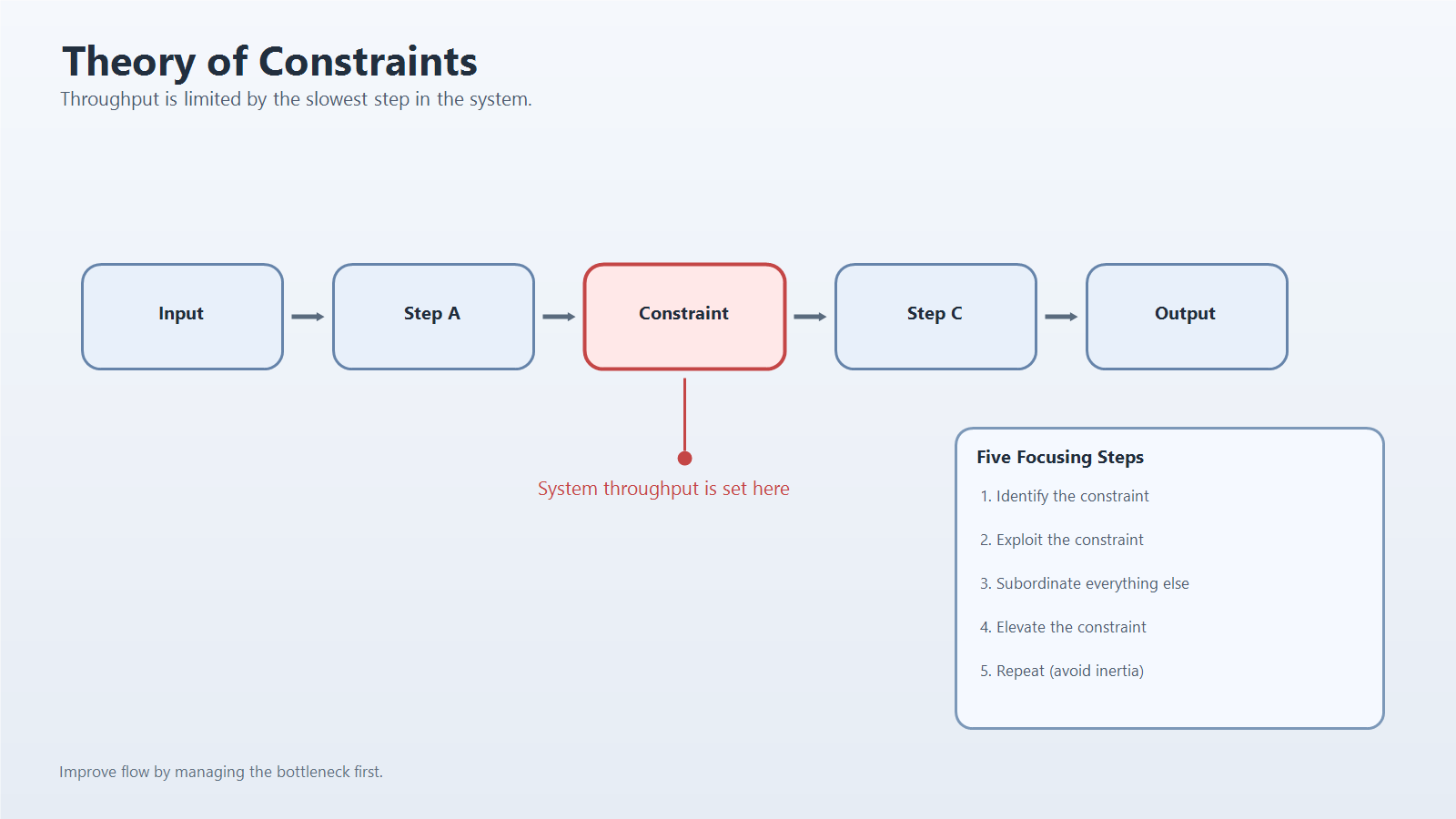
Theory of Constraints

  • Typing is no longer the main bottleneck
    • We produce code faster than we can understand it.
  • Understanding the problem dominates
    • This is now the constraint.
    • Spec quality and architectural choices limit progress.
    • Architect for ability to reason about the system.
  • Decomposition still matters
    • Large problems need careful slicing.
  • Verification is the safety valve
    • Confidence costs (time & money).
Theory-of-Constraints-General-Flow.png

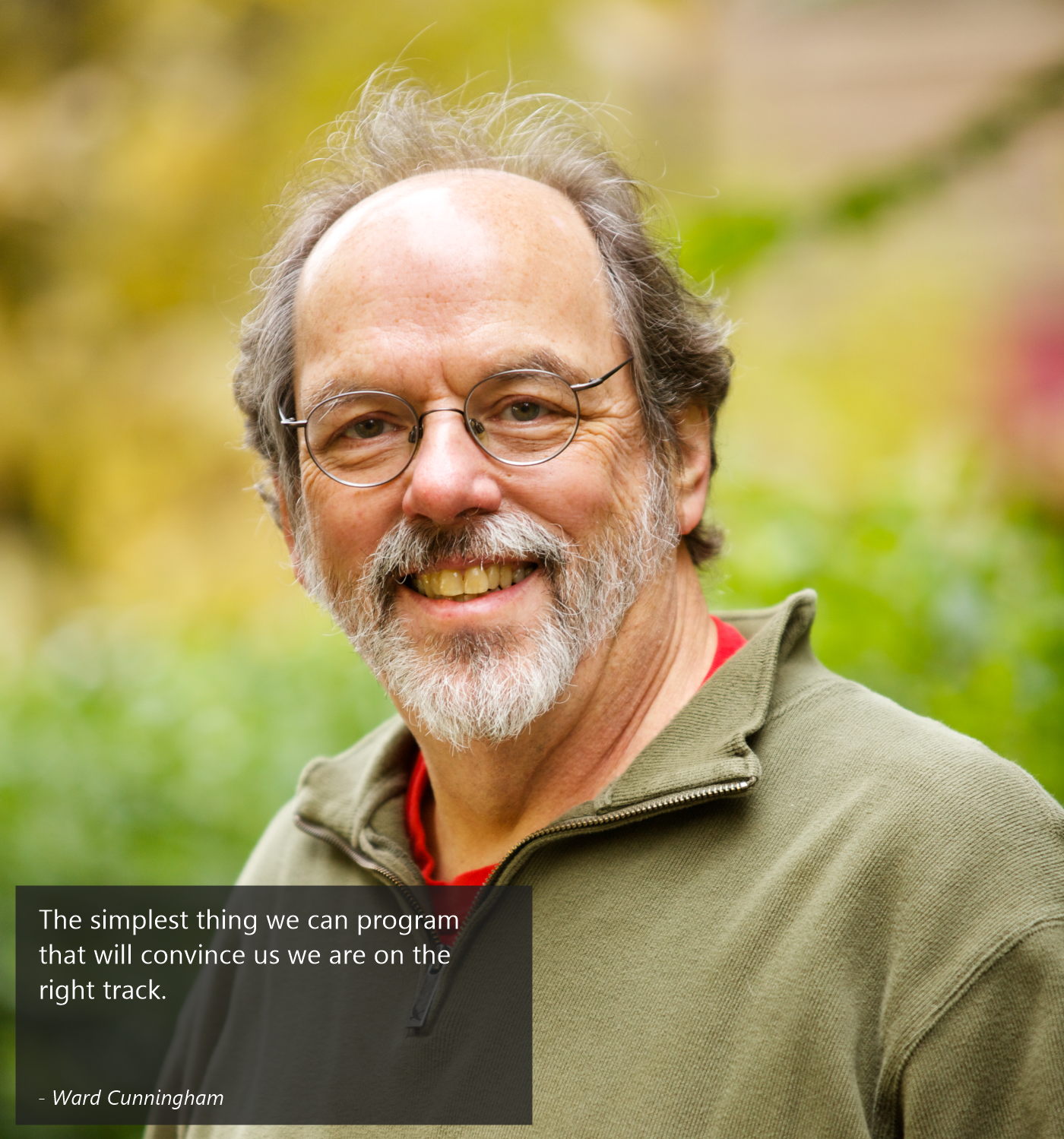
Principle - Simplest Thing First

  • Start with the smallest meaningful step
    • Write the minimum failing test that proves you are solving the right problem.
  • Then evolve safely
    • Make it pass, then refactor after behavior is protected by tests.
  • Principle, not recipe
    • This is the same mindset we apply to evolving AI-assisted workflow.
Ward-Cunningham-Quote-Overlay.png

Red-Green-Refactor Defines Scope

  • Use the loop as the decomposition boundary
    • Each step is a bounded implementation unit.
  • Red defines control
    • Failing tests represent our definition of done.
  • Green uses minimal bounded implementation
    • Implement only what is needed and in-scope.
  • Refactor restores clarity before expansion
    • Review, validate, and clean up before moving on.
  • Result: speed without loss of accountability
    • Controlled implementation in a logical process.
classic-tdd-baseline-loop-vertical.png

TDD Helps Keep Scope In-Check

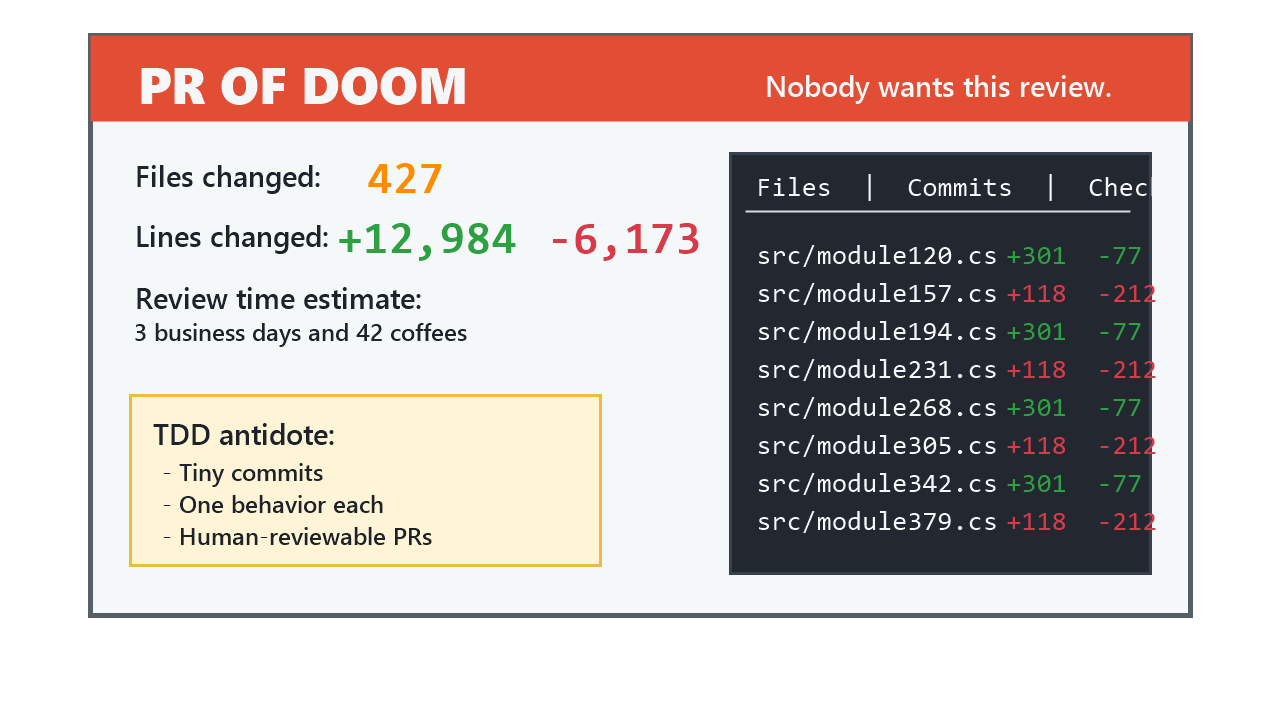
  • TDD breaks work into manageable chunks
  • Each loop covers a single behavior
  • Small steps reduce cognitive load and risk
  • Focused tests clarify intent and boundaries
  • Confident refactoring possible with narrow scope
tdd-pr-of-doom.png

Tests Matter More Than the Code

  • Define what the system must do
    • Any agent (human or machine) can read the test to understand intent
  • Guarantee correctness
    • Visible to both machines and humans
  • Make implementation safely changeable
    • Any agent (human or machine) can refactor ruthlessly
  • Tests outlive implementations
    • Code is temporary; behavior is durable
    • Tests preserve the behavior

Key takeaways - If the tests are right, the code can be anything - If the tests are wrong or missing, the code can't be trusted

Contract 800x800.jpg

Coupling and Cohesion

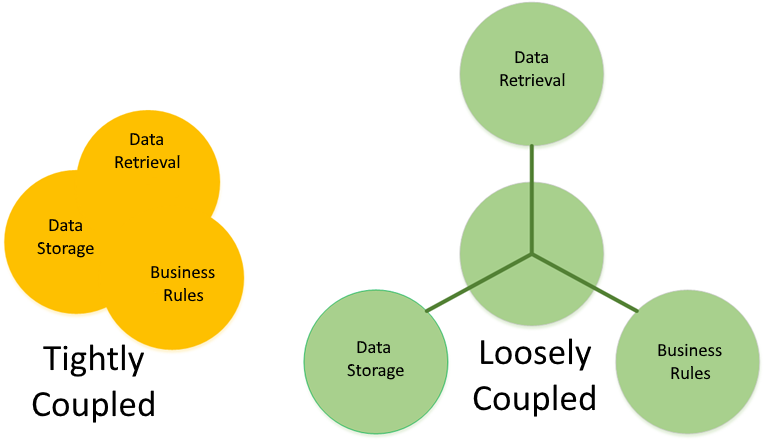
  • Coupling: dependency load between units
    • Tighter coupling means 1 change forces many edits
    • Increases complexity and raises risk
  • Cohesion: focus within a unit
    • High cohesion means modules have 1 reason to change
    • Changes are isolated to a single module
  • The TDD loop exposes design friction
    • Red reveals setup and dependency pain
    • Green shows overreach pressure
    • Refactor makes unclear responsibilities obvious
Loose vs Tight Coupling.png

The Facade Family of Patterns

  • Facade creates a stable test seam
    • Callers get a small, stable surface area
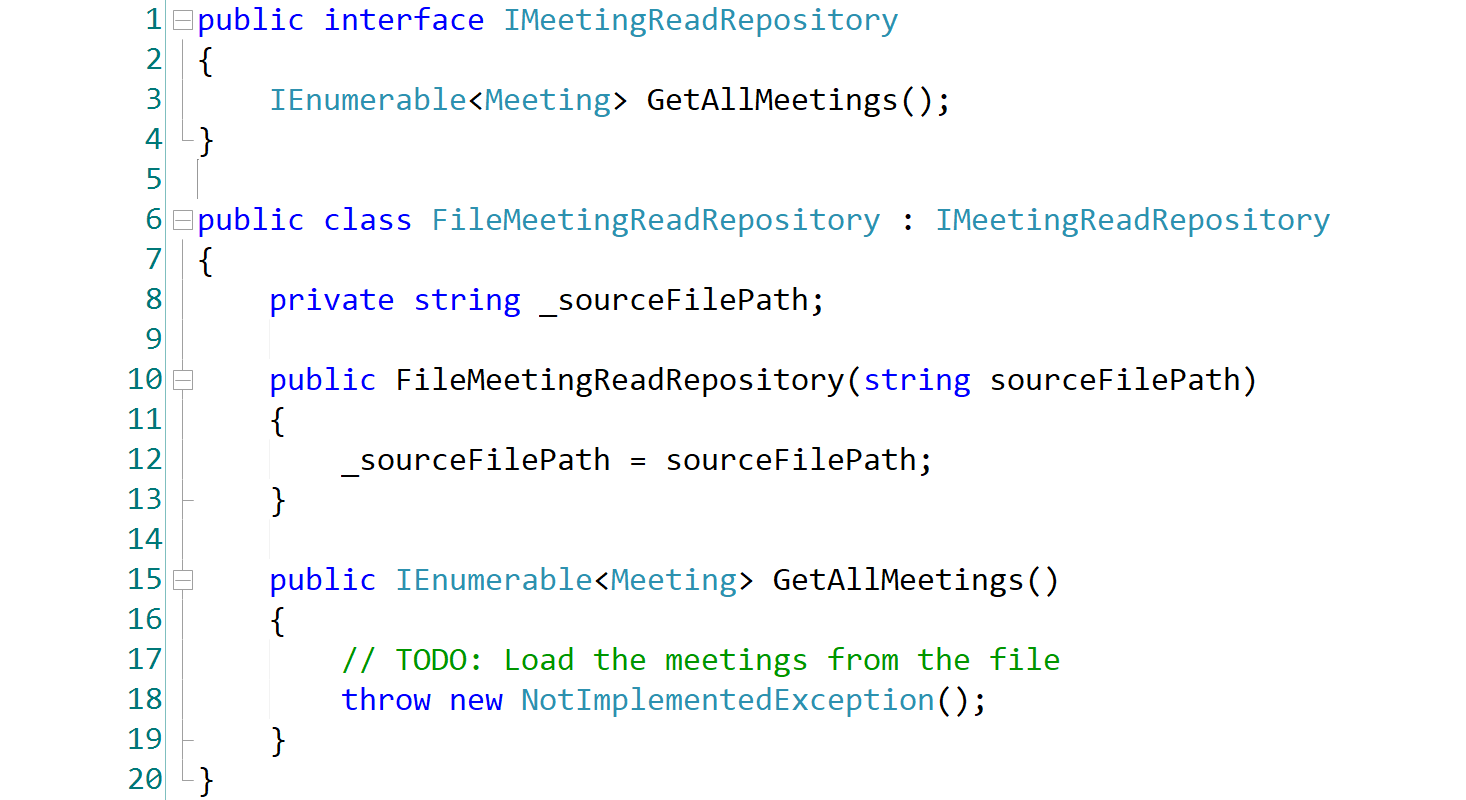
  • Repository is facade for data access
    • Tests can isolate persistence with fakes/mocks
  • Strategy is facade for business logic
    • Behavior can be tested independent of algorithm
Repository Sample 1466x800.png

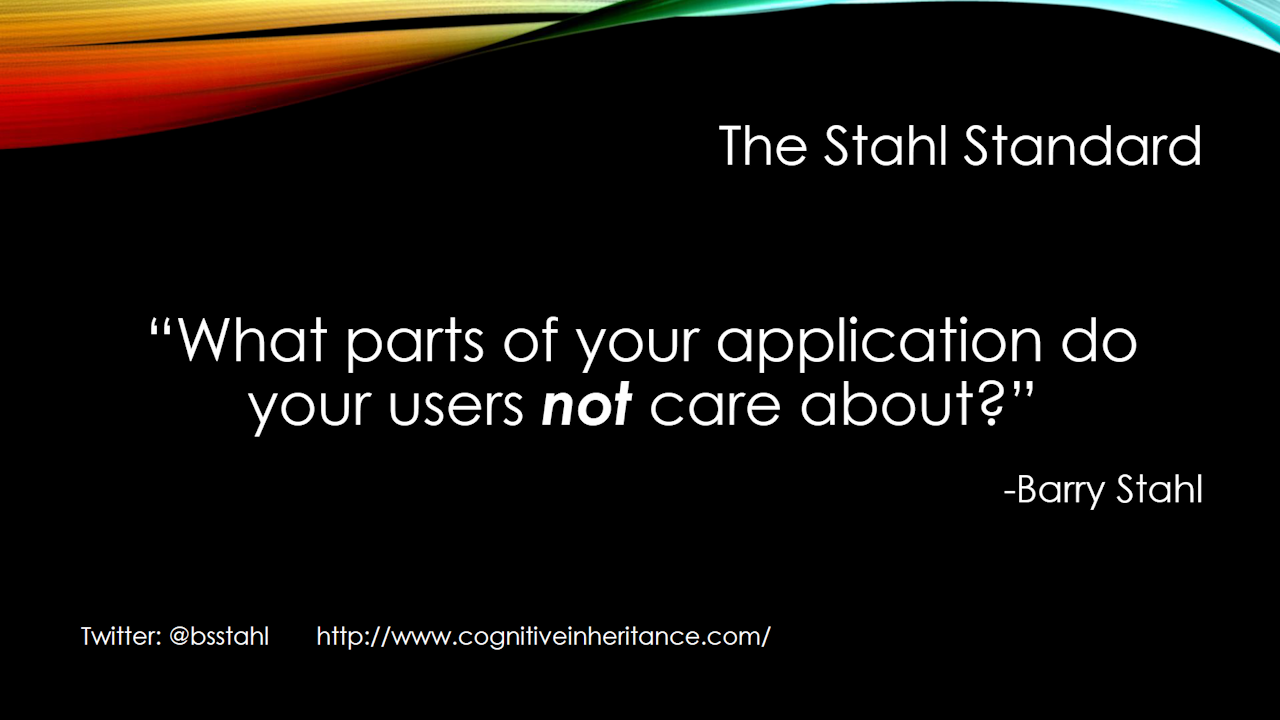
What Do We Need to Test?

  • Do we need 100% test coverage?
  • What is "too trivial" to test?
  • Should we test infrastructure code like logging?
WhatToTest-800x800.png

What Do We Need to Test?

TheStahlStandard.png

Testing In Isolation

  • London School — Interaction-Driven

  • Detroit School — Behavior-Driven

    • Kent Beck & Martin Fowler
    • Unit = a behavior across objects (few mocks)
    • Tests assert outcomes
    • Pros: resilient tests, refactoring freedom
    • Cons: harder to isolate business rules
Embedding Differences - USA UK Argentina - 800x800.jpg

Recommended Approach

  • Detroit Philosophy at the Core

    • Test behavior, not interactions
    • Use real collaborators within a layer
    • Keep tests stable under refactoring
  • Guiding Principle

    • Define layer boundaries using SRP
    • Mock/Fake boundaries, not objects
    • Test behaviors, not collaborations
    • Examples: data stores, external services, etc.
  • Why This Works

    • Invariants tested in full isolation
    • Internal object graph can evolve freely
    • Clear seams for integration, observability, and resilience
RoadToSuccess.jpg

TDD Before AI

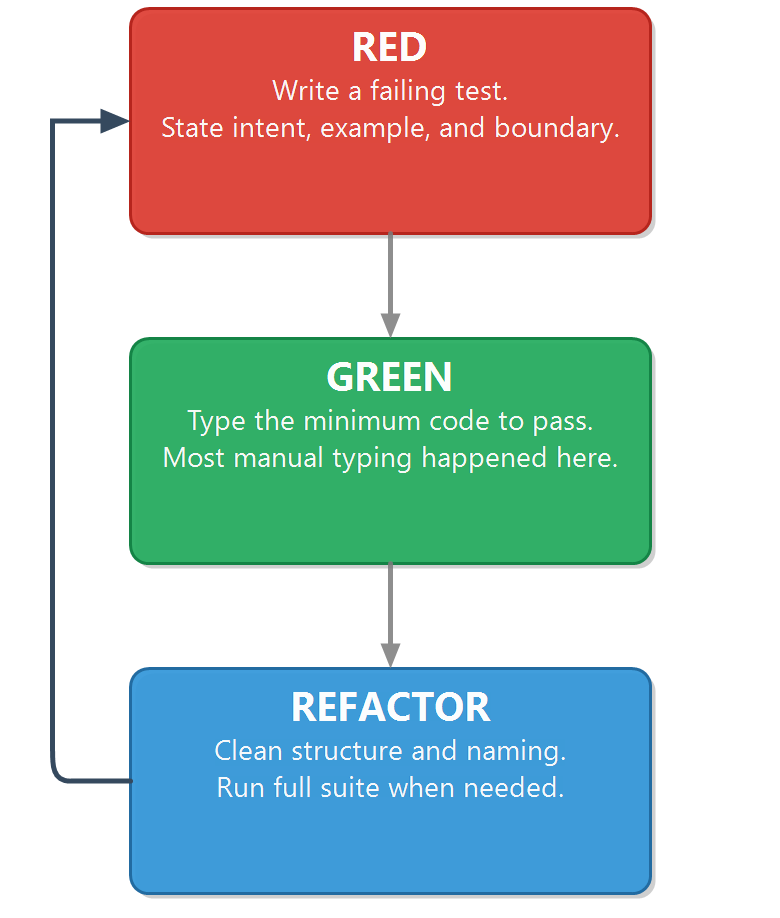
  • Red: write one failing test.
    • Describe intent and any boundaries.
    • Tools might help stub the tests.
  • Green: Write the minimum code for tests to pass.
    • Most manual typing happened here.
    • Don't create structure, just get to green.
  • Refactor.
    • Clean up names and logic.
    • Improve structure and design.
    • Run full test suite to prevent regressions.
classic-tdd-baseline-loop-vertical.png

Tests Drive the Next Action

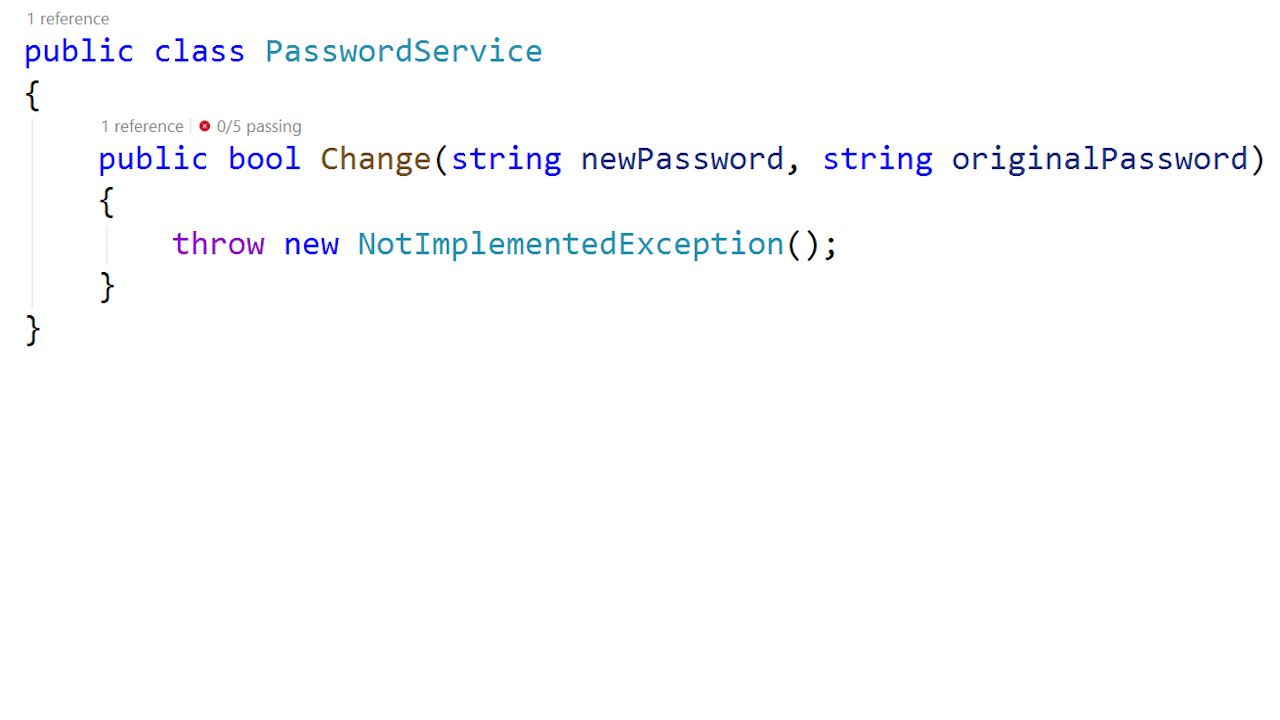
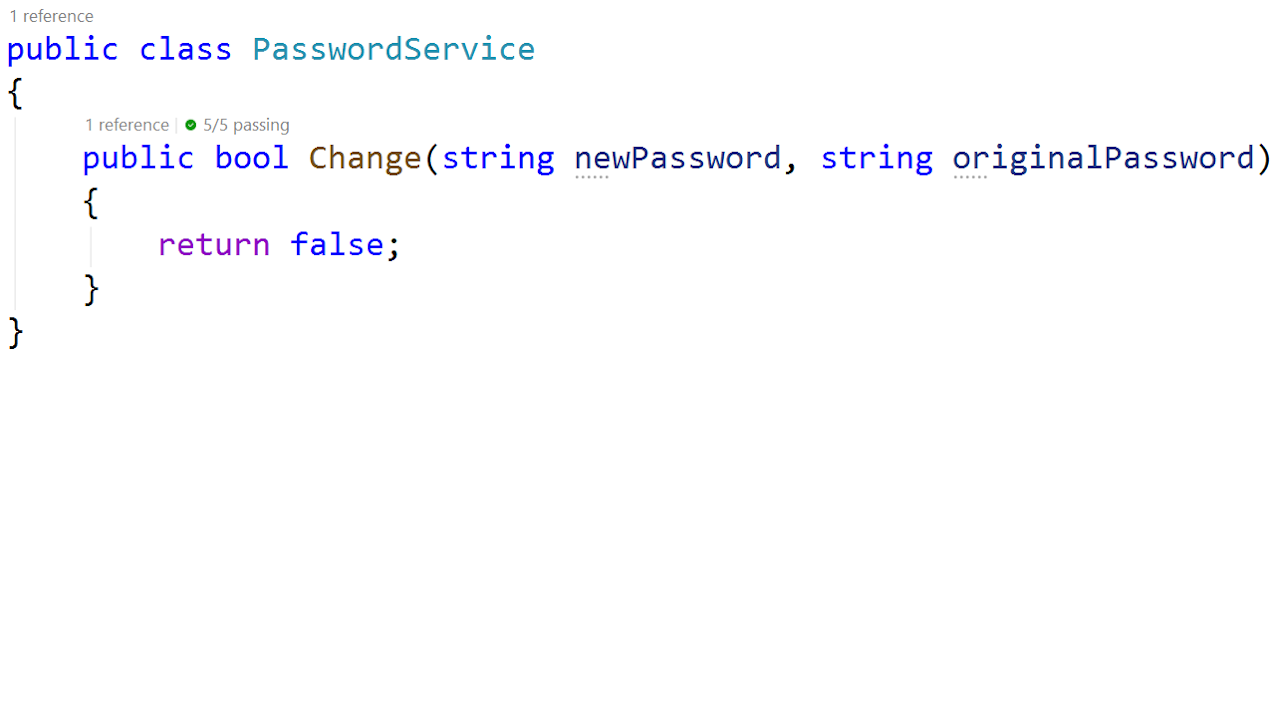
Change Password service

  • Invariants
    • newPassword must meet criteria
    • oldPassword must match current password
  • If invariants are satisfied, password is updated
    • Change is successful → return true
    • Return false otherwise
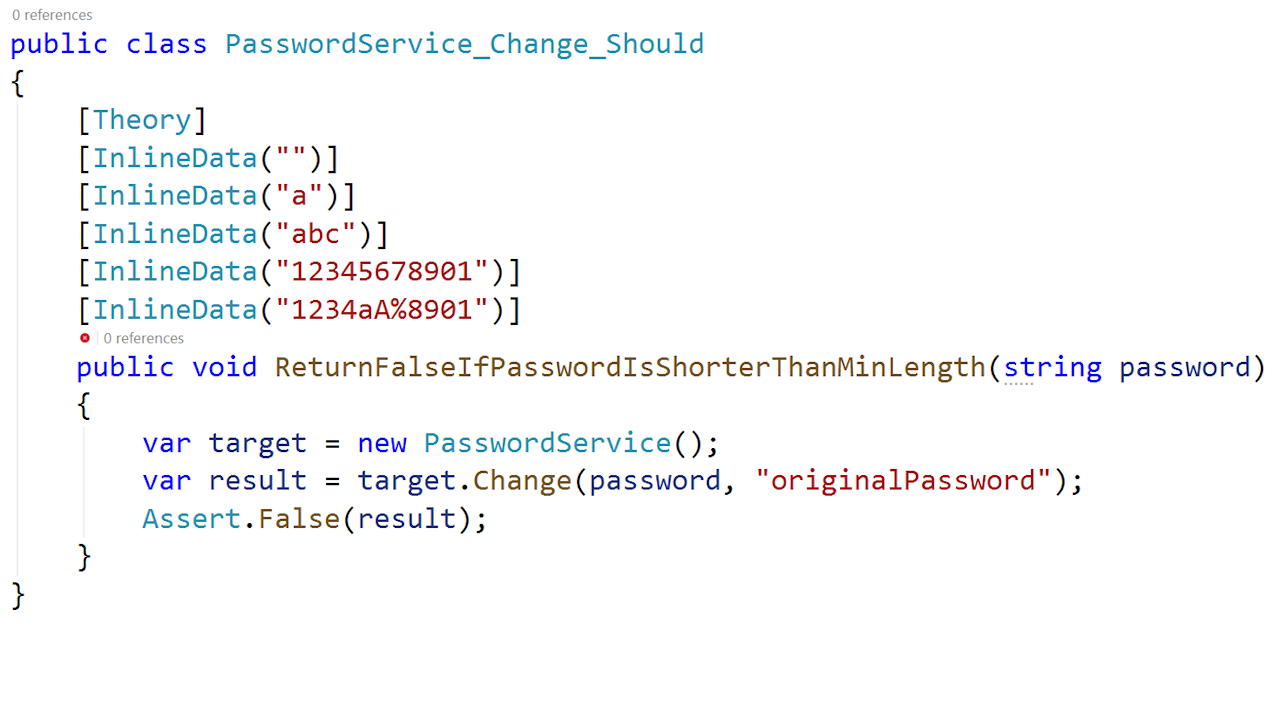
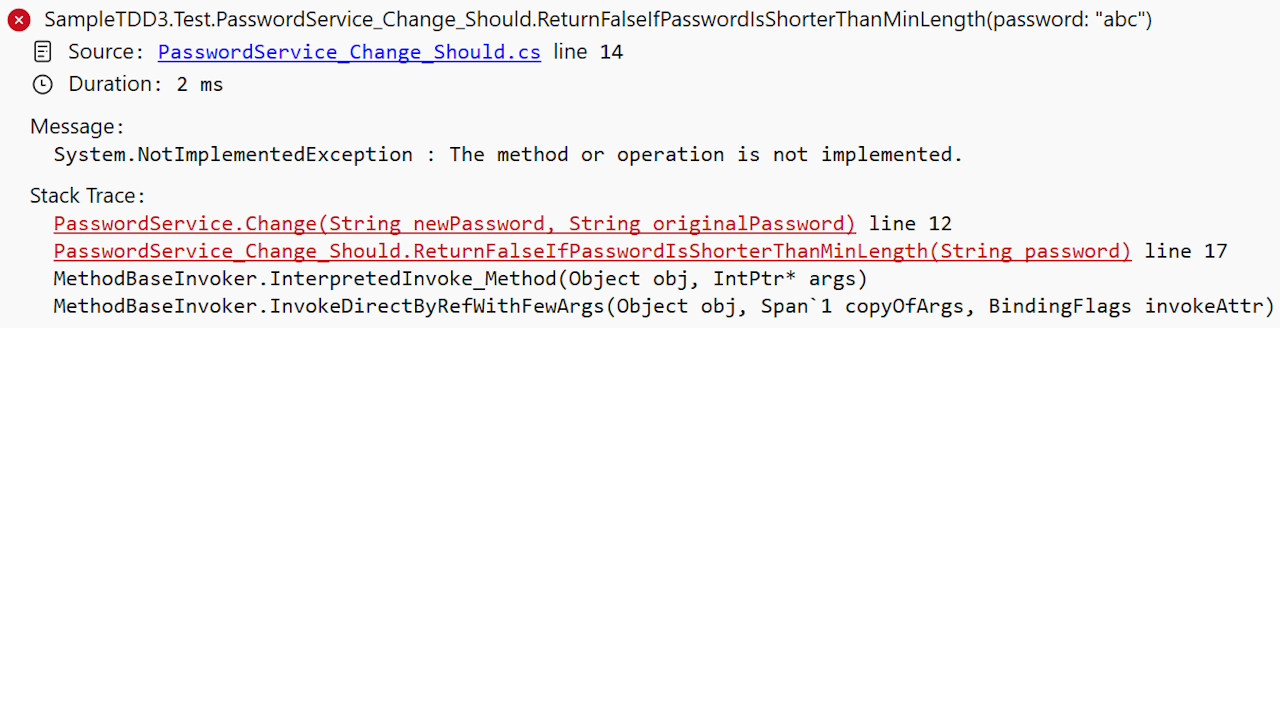
  • Start with Test 1: minimum length check
    • Stub the function
    • Create the test
    • See the test fail appropriately
  • Questions:
    • Method signature (input/output)
    • API Surface location
    • Criteria for password strength

Test Cases:

[*] <n chars → false

[ ] old <> current → false

[ ] All rules satisfied → true

Method Stubs

Language Canonical Stub Mechanism
C# throw new NotImplementedException();
C++ throw std::logic_error("Not implemented");
Elixir raise "not implemented"
Go panic("not implemented")
Java throw new UnsupportedOperationException("Not implemented");
JavaScript / TypeScript throw new Error("Not implemented");
Kotlin TODO("Not implemented")
PHP throw new \BadMethodCallException("Not implemented");
Python raise NotImplementedError("Not implemented")
Ruby raise NotImplementedError, "Not implemented"
Rust todo!()
Swift fatalError("Not implemented")

Stub the API Surface

PasswordService_Change_Stub-1280x720.png

Min Length Test

PasswordService_Change_MinLengthTest-1280x720.png

Tests Must Fail Properly

PasswordService_Change_MinLengthTest-FailureMessage-1280x720.png

Do the Simplest Thing

PasswordService_Change_SimplestThing-1280x720.png

Refactor-Now Signals

  • Duplication is growing
    • Similar logic appears in multiple places.
  • Responsibilities are blurred
    • Single Responsibility Principle (SRP) is violated.
  • Naming no longer matches intent
    • Tests pass, but names and structure obscure the behavior.
  • Change impact is widening
    • Behavior updates require touching many files or call sites.
  • Tests are brittle or hard to write
    • Setup is heavy, seams are unclear, or assertions over-specify implementation details.
  • Invariants are scattered
    • Critical rules are enforced in several locations instead of one clear boundary.
Copilot_20260525_184617.png

Next Test Decision

  • Next behavior to add
    • Reject the password change when the supplied current password does not match the stored password.
  • New pressure introduced
    • The test needs current-credential context that likely comes from storage.
  • Constraint to preserve
    • Keep scope small and feedback fast while protecting design boundaries.
  • Option 1: Compare in method
    • Repository returns credential data; matching rule stays local.
  • Option 2: Compare via in-process service
    • A domain service inside this app owns behavior.
  • Option 3: Delegate to external auth
    • Use an external authority and consume the result.

Same Discipline-New Pairing

  • What stays the same

    • Red-Green-Refactor remains the control loop.
    • Tests still define intent and verify correctness.
    • Human judgment still owns architecture, boundaries, and acceptance criteria.
  • What changes with AI pairing

    • Idea/prototype throughput increases.
    • Prompting and decomposition quality become bottlenecks.
    • Verification rigor must increase because plausible output is cheap.
Same-Discipine-New-Pairing.png

AI as a Pairing Partner

  • Mutual learning relationship
    • You learn from their approaches and methods.
    • They learn and remember your patterns & preferences.
  • Dialogue and refinement
    • Have conversations with AIs about approaches.
    • You guide direction; they generate options.
  • Key difference from junior developers
    • No ego or defensiveness; they adapt to your feedback.
    • Consistent availability and tireless iteration.
    • Stop anytime and pick up where you left off.
Split Brain 800x800.jpg


TDD with AI Coding Agents

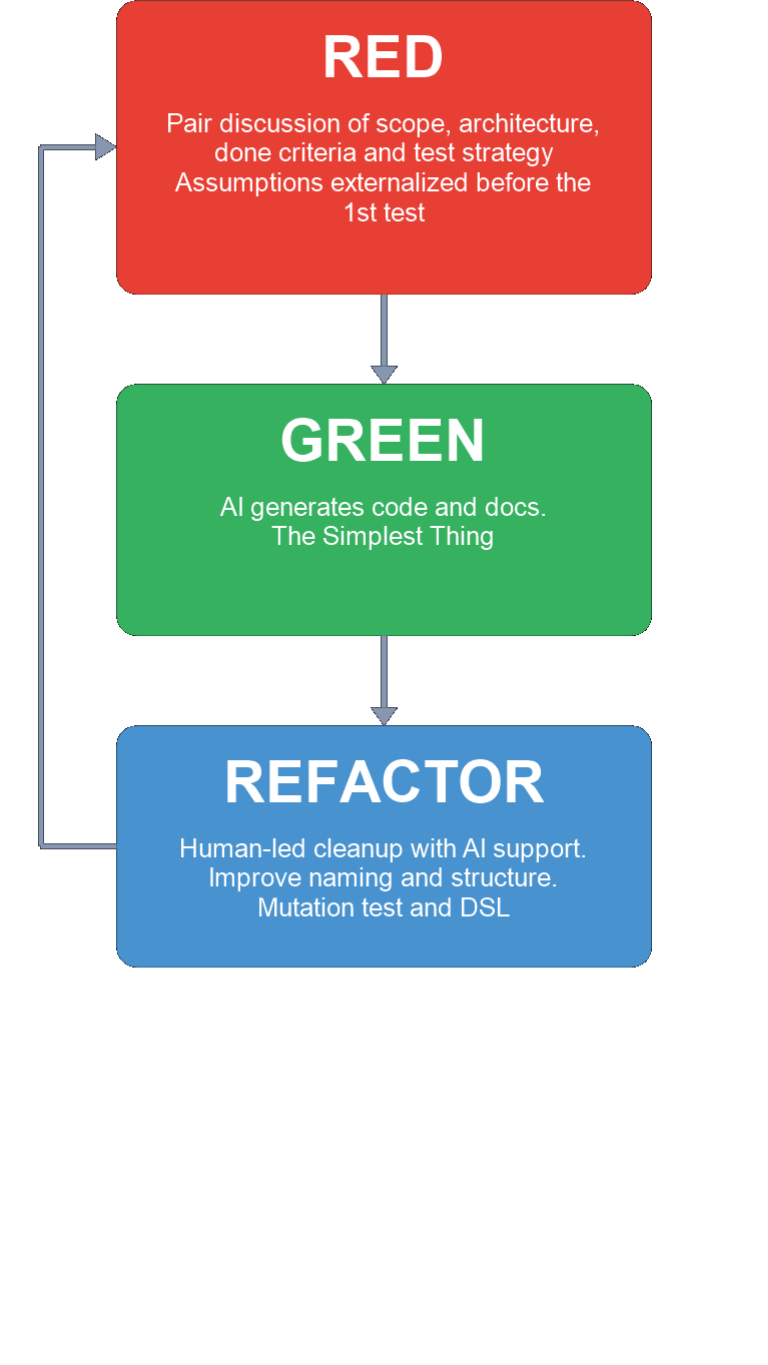
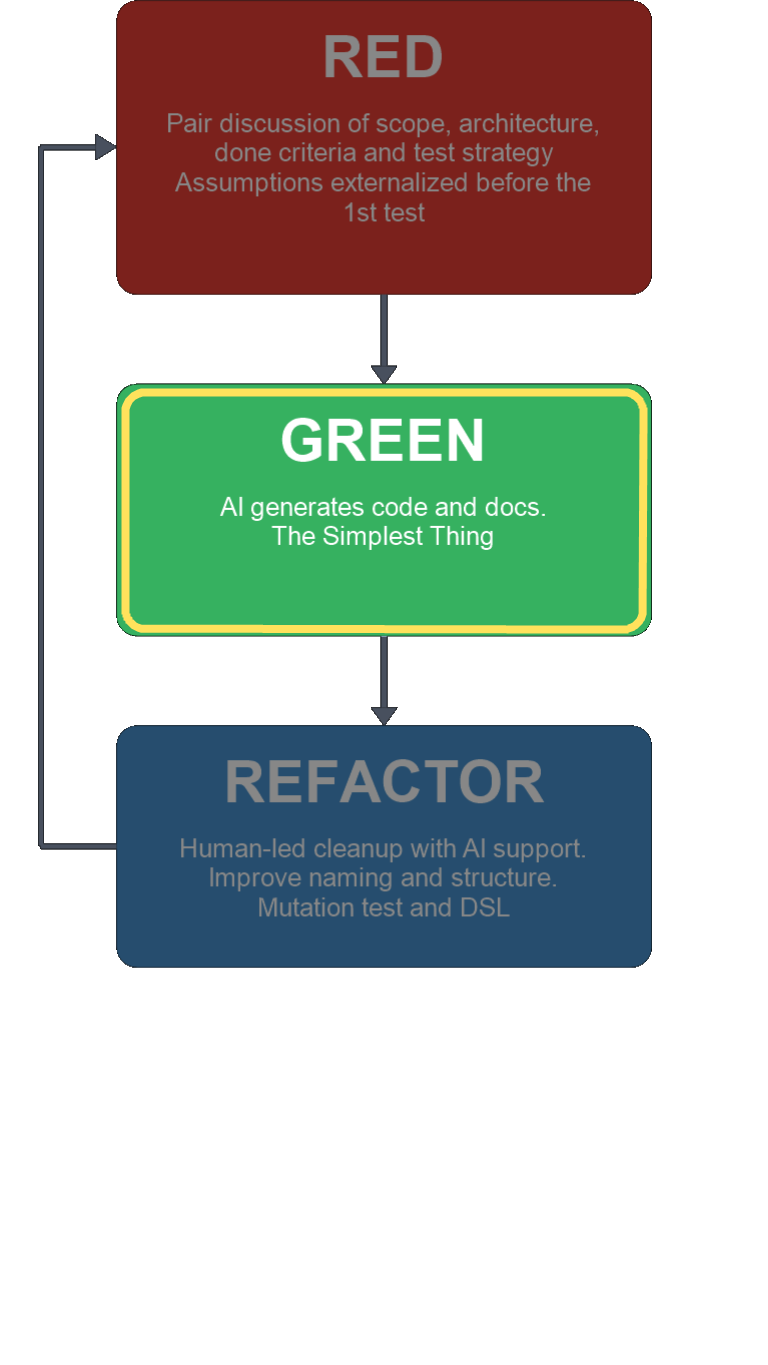
  • Red: compact context and discuss scope with AI.
    • Architecture constraints, done criteria, and test strategy.
    • Externalize assumptions before the first failing test.
  • Green: generate code and supporting docs.
    • AI proposes implementation options.
    • Human forces limitation to "Simplest thing...".
    • Keep documentation aligned with the implementation.
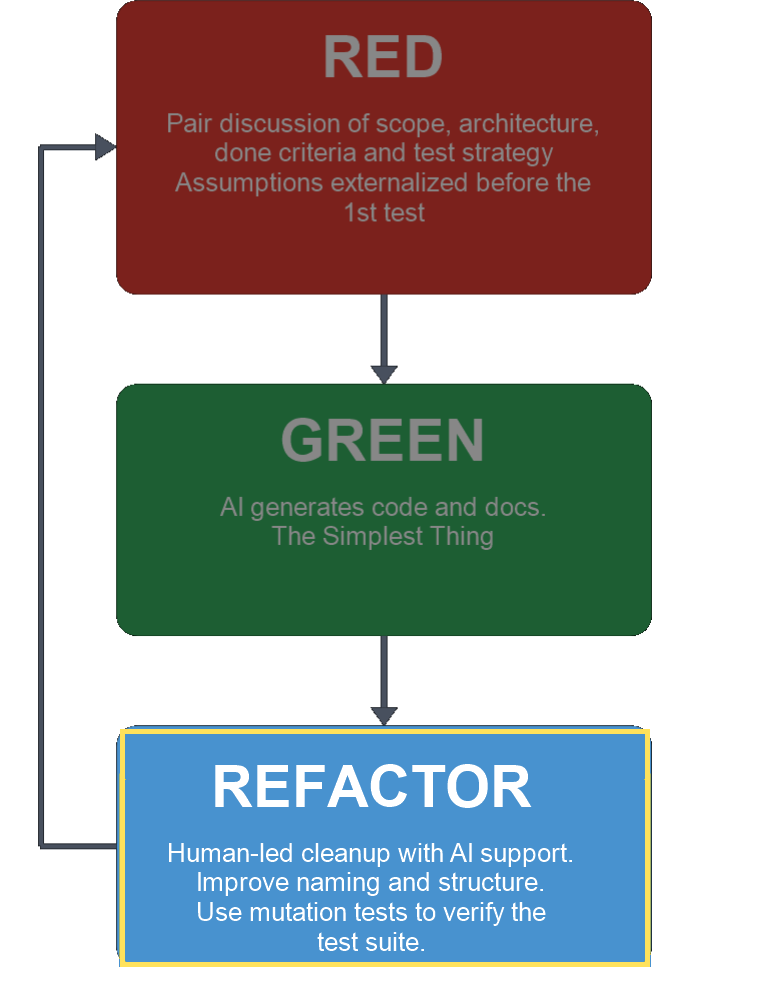
  • Refactor: clean up structure and improve.
    • Better naming, shape, and reuse.
    • Push toward a DSL whenever reasonable.
    • Use mutation testing to validate the test suite.
ai-assisted-tdd-loop-vertical.png

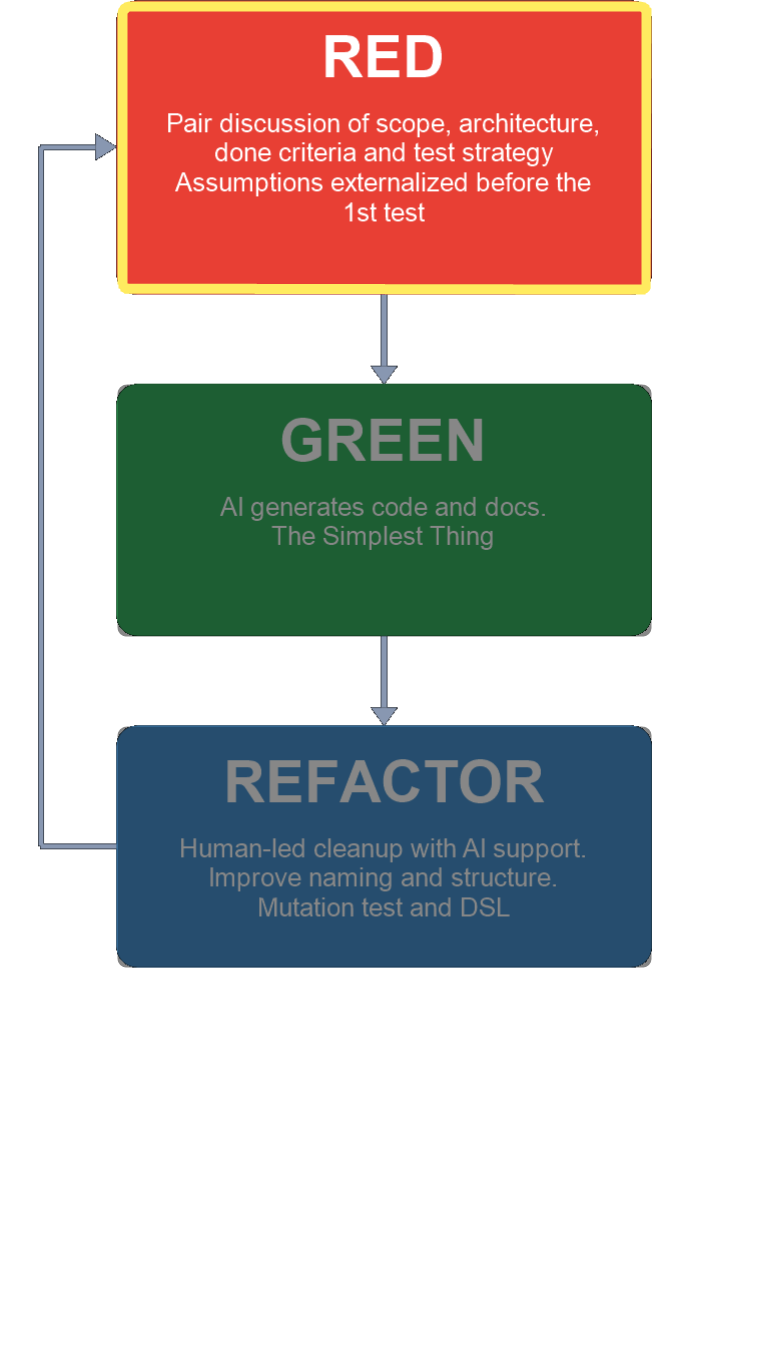
Red Step: Establish Constraints

  • Setup
    • Compact context if needed.
    • Discuss scope and strategy.
  • Define inputs and outputs.
    • Data shape, required/optional fields.
    • Validations and state changes.
    • Emitted events and visible behavior.
  • Define constraints and done criteria.
    • Feature Invariants.
    • Allowed external calls and dependencies.
    • Idempotency, and ordering.
    • Errors and retries that are in-scope.
    • What is explicitly out-of-scope.
  • Add failing test(s) that enforces scope.
    • More than 1-2 tests to start is a scope smell.
    • Prompt pattern: "Strict TDD mode; no behavior yet."
ai-assisted-tdd-loop-vertical-red-highlight.png

Green Step: Implement Minimal Pass

  • Implement the minimum behavior to make tests pass.
    • Lock scope to Red-step constraints.
  • Propose implementation options.
    • Only what is required to make the tests pass.
  • Determine tools/frameworks only when required.
    • Refactor toward preferred patterns later.
    • Do not build object graphs yet.
  • Keep documentation aligned with implementation.
    • Update or create docs to reflect behavior and constraints.
  • Run tests and confirm the suite is green.
    • Prompt pattern: "Strict TDD mode; satisfy tests only."
ai-assisted-tdd-loop-vertical-green-highlight.png

Refactor Step: Prove and Improve

  • Refactor for clarity without changing behavior.
    • Improve names, decomposition, and reuse.
    • Create object graphs and add frameworks as needed.
    • Refactor both tests and production code if appropriate.
      • Be sure tests are stable before touching production code.
  • Strengthen confidence in the suite.
    • Run full tests after each meaningful refactor batch.
    • Run coverage and inspect uncovered paths.
    • Use mutation testing to expose weak assertions.
  • Squash here if appropriate to keep history clean.
  • Prompt pattern: "Strict TDD mode; refactor only; preserve behavior."
Refactor_e3cf6867-1466-40a8-ad47-c91d78c6cc46.png

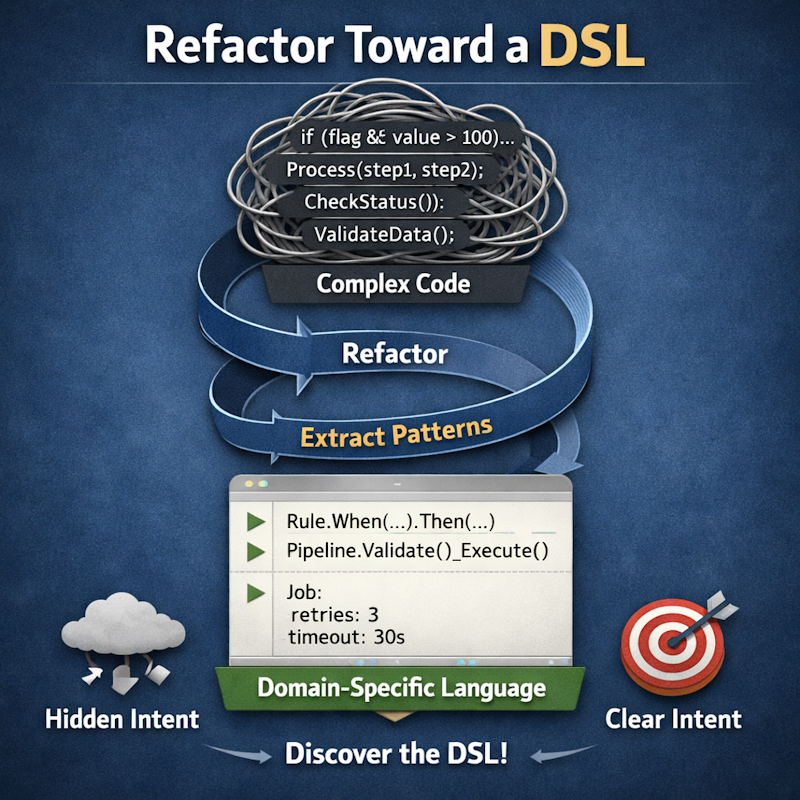
More & Better Refactorings

  • Use builders setup data more maintainably
    • For both tests and production code
  • Extract methods to improve readability
    • Make liberal use of Extension methods or equivalents
  • Create tests that are as declarative as possible
    • The test's intent should be directly readable in the test
    • Readable tests matter more than clean prod code
    • Clean Code -- But for Tests!
RefactorToDSL_800x800.png

Validate Using Coverage

  • Did we test what we built?
    • Verify expected and edge behaviors have explicit assertions.
  • Missing coverage is a critical signal
    • Uncovered paths may indicate code is not acting as expected.
  • Did we build what we tested?
    • Confirm implementation still matches test intent after refactor.
  • Missing coverage is a critical signal
    • Uncovered paths may mean we coded ahead of the test.

Coverage Decision Gate

  • Question every gap
    • Missing test?
    • Poorly behaving code?
    • intentional scope boundary?
  • Decision before proceeding
    • If alignment is unclear, pause and strengthen tests before moving on.
  • Proceed rule
    • Move forward when confidence is behavior-based, not percentage-based.
Pause-Sign-2.png

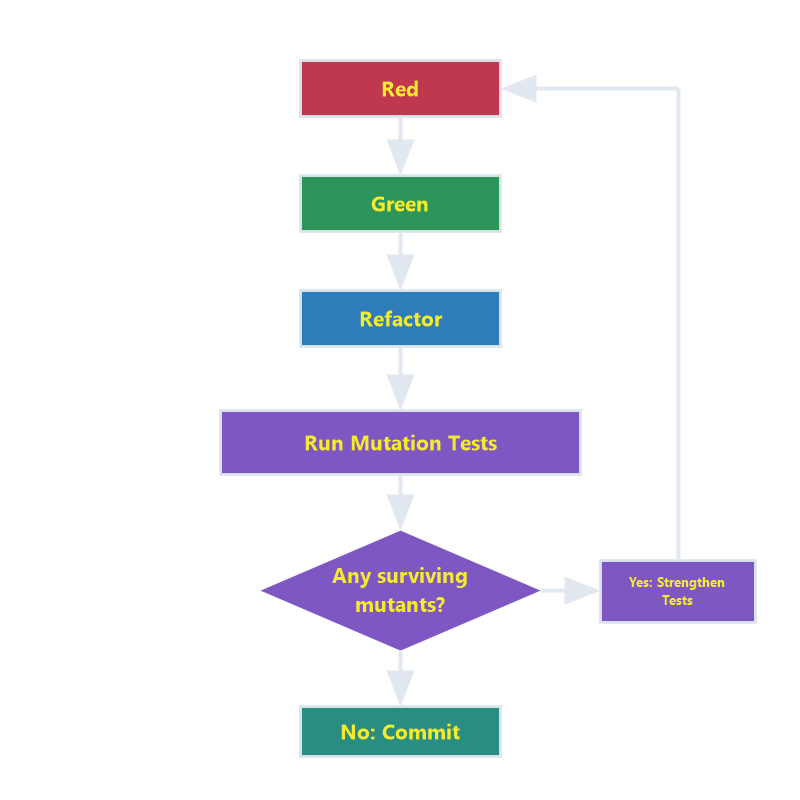
Validate Tests with Mutations

  • Mutate code intentionally
    • Mimic realistic defects
  • Run existing tests against each mutant
  • Killed mutants - Tests fail as expected
    • Validates tests detect incorrect behavior
  • Surviving mutants - Tests still pass
    • Expose weak assertions or missing cases
  • AI agents automate the loop
    • Mutations can be run early and often
    • Used to be too dificult for regular use
WhatIsMutationTesting-ConceptDiagram-800x800.png

Mutation Testing in the AI Era

  • Run mutation tests early and often
    • Validate that tests catch real defects, not just happy paths.
  • Treat surviving mutants as feedback
    • Strengthen assertions, add missing cases, or tighten boundaries.
  • AI changes the economics
    • What used to be costly and slow is now practical inside normal loops.
MutationTesting-TDD-Flowchart-800x800-labeled-v2-transparent.png

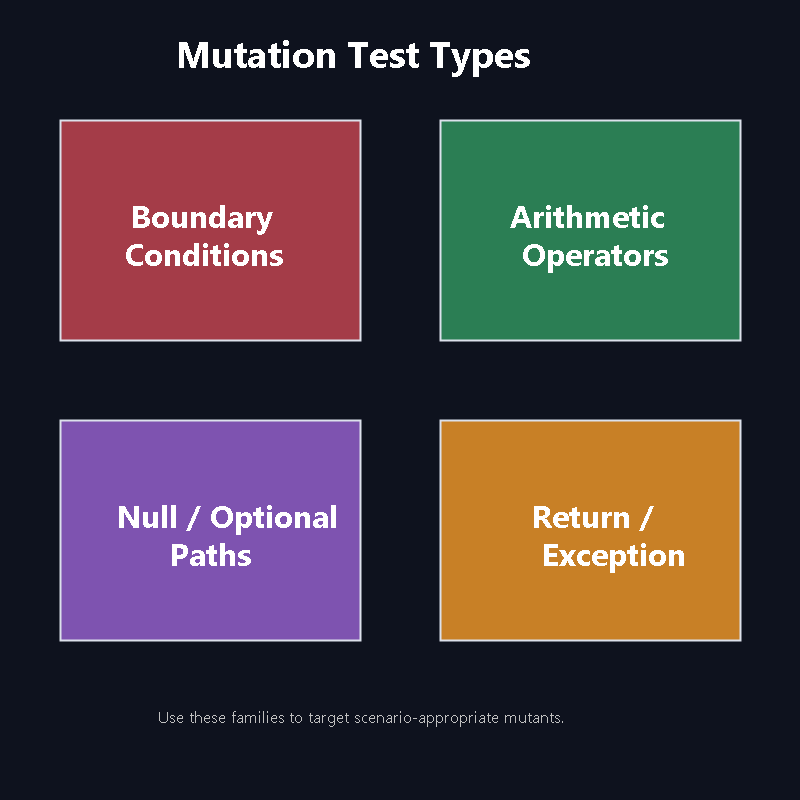
Some Types of Mutations

  • Boundary conditions

    • Original: if (count < max)
    • Mutated: if (count <= max)
  • Arithmetic operators

    • Original: total + fee
    • Mutated: total - fee
  • Null / optional paths

    • Original: user?.email handling
    • Mutated: force null branch behavior
  • Return / exception behavior

    • Original: return Success
    • Mutated: throw ValidationException
MutationTestTypes-800x800.png

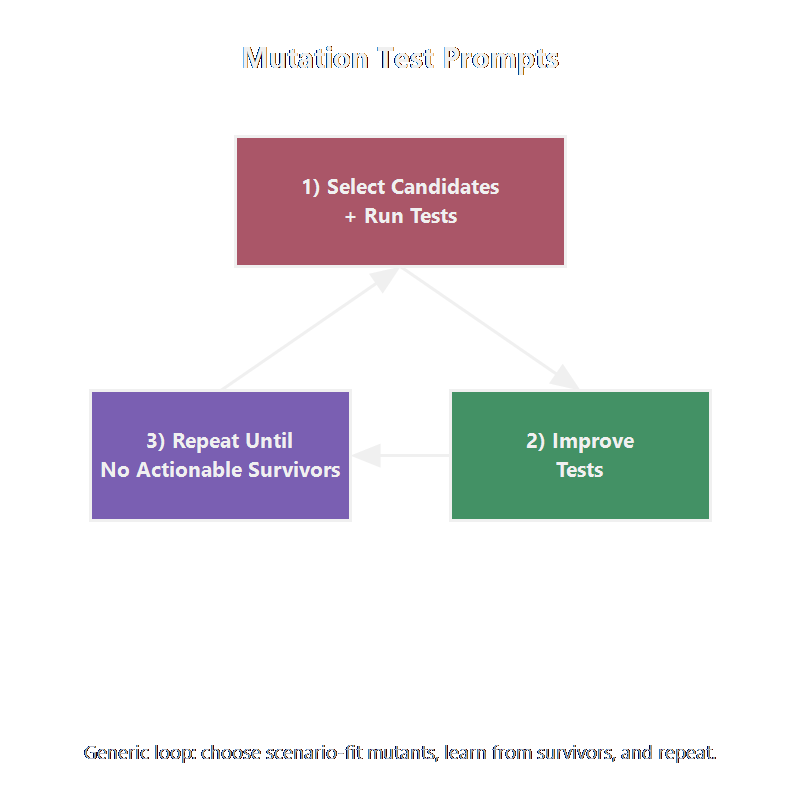
Mutation Test Prompts

  • Select candidates + run tests

    • "Knowing this feature and tests, create code mutations likely to expose gaps in the tests, and run the tests with them in place."
  • Improve tests

    • "For surviving mutants, implement stronger tests and assertions. Do not modify production code."
  • Iterate

    • Repeat until survivors are equivalent or out of scope. When complete, remove the mutations.
MutationTestPrompts-GenericLoop-800x800.png

Optional Amplifiers, Core Workflow

  • Refactoring prompts and mutation testing
    • Increase confidence, speed, and signal quality.
  • Capability amplifiers
    • These are optional power-ups, not entry requirements.
  • Use when risk is high
    • Apply them when complexity or cost of change increases.
  • Skip when loop is already crisp
    • If feedback is clear and fast, keep the cycle lean.
  • Baseline stays constant
    • Red-Green-Refactor remains the control system.
  • Next step
    • Define the default workflow teams can run consistently first.
Tools-for-your-workflow.png

Human-AI Adoption Patterns

  • Start narrow, then iterate
    • Strong adopters begin with constrained use and expand as confidence grows.
  • Speed gains do not remove human responsibility
    • AI helps with implementation throughput.
    • Humans still own decomposition, design judgment, and verification.
  • Calibration beats novelty
    • Teams improve by iterating on outputs.
  • TDD-aligned takeaway
    • Begin with the simplest safe loop, then refactor

Research: Barke et al. (2023); Nair et al. (2023); Chen et al. (2021).

Five Doors 800x800.png
 

Types of tools Available

  • By host
    • In the browser
    • In the terminal
    • In the IDE
  • By purpose
    • Code generation
    • Specification generators
    • Workflow orchestrators
Workshop-800x800.png

Code Generation Tools

  • What they do
    • Generate code, tests, and refactor suggestions.
  • How they fit TDD
    • Used inside each red-green-refactor step.
    • Verify with test suite before accepting output.
  • Why they help
    • Reduce time spent on syntax and boilerplate.
    • Humans focus on correctness and risk decisions.
  • Practical guardrails
    • Small prompts, short diffs, and frequent test runs
    • Review generated code as if from a new teammate.
Copilot-Web-800x800.png

Specification Generation Tools

  • What they Produce
    • Structured requirements
    • Constraints
    • Acceptance criteria
  • How they fit TDD
    • First, create a specification
    • Then derive tests from it
    • Finally, implement only what is needed.
  • Why they help
    • Reduces churn
    • Catches requirement gaps
    • Keeps test intent aligned with behavior
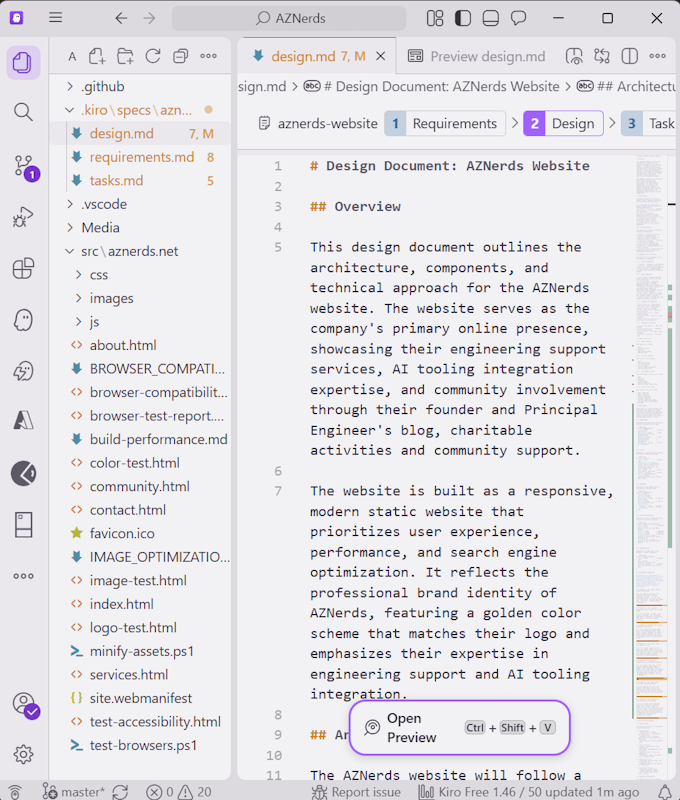
Kiro-Spec-680x800.png

Workflow Tools

  • What they do
    • Coordinate multi-step tasks.
    • Bridges tools, repositories, and prompts.
    • Includes state, retries, and handoffs.
  • How they fit TDD
    • Automate repetitive workflow segments.
    • Preserve human checkpoints.
  • Where to add guardrails
    • Require plan approval
    • Enforce test pass gates
    • Cap diff size
    • Require explicit review before merge
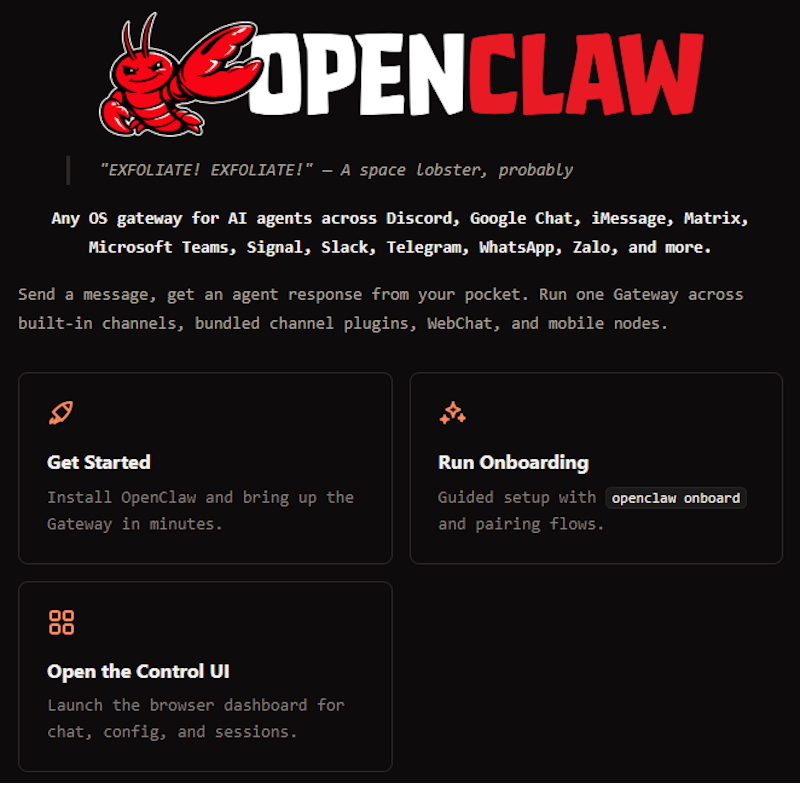
Openclaw-800x800.png

Tool Matrix by Purpose

Tool Code Gen Spec Gen Workflow Reference
Claude Primary Supported Supported Claude Code Docs
Cline/Roo Primary Supported Supported Cline Docs & Roo Docs
Copilot Chat Primary Supported Supported Copilot Chat Docs
Copilot CLI Primary Supported Supported Copilot CLI Docs
Cursor Primary Supported Supported Cursor Docs
Kiro Supported Primary Supported Kiro Docs
OpenClaw Supported Supported Primary OpenClaw Repos
OpenCode Primary Supported Supported OpenCode Repos
OpenSpec Supported Primary Supported OpenSpec Repos
SpecKit Supported Primary Supported SpecKit Repo
Squad/Ralph Supported Supported Primary Squad Repos

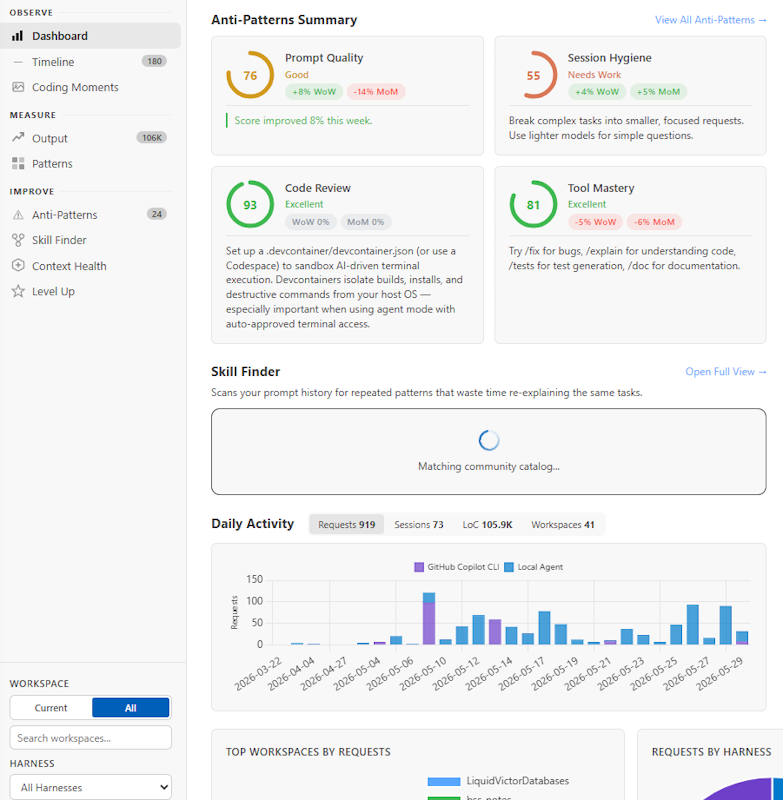
AI Coach

  • What AI Engineer Coach is
    • VS Code extension to analyze coding session logs.
    • Turns usage details into coaching insights.
    • Helps improve how your team uses those tools.
  • What it provides
    • Anti-pattern detection
    • Skill discovery
    • Lots more now and in the future
  • Reference
AIEngineerCoach-783x800.png

Who Succeeds in the AI Era

  • Define the problem and constraints clearly
    • Give the model bounded, testable targets.
  • Recognize good architecture and tool choices
    • Match patterns and tools to the scenario.
  • Verify output with tests and quality gates
    • Treat model output as a draft, not a guarantee.
  • Evolve workflows and tools as confidence changes
    • Start simple, then increase capability deliberately.
  • Delegate effectively to people and agents
    • Orchestrate grunt-work.
    • Keep accountability human.
  • In short: think like a solution architect
    • Own outcomes, tradeoffs, and verification.
SolutionArchitect-800x800.png

Start Where You Are

  • If you already have Copilot in VS Code
    • Start there and keep your loop tight.
  • If you already have Claude Code or OpenCode
    • Start there and apply the same TDD gates.
  • If you are new to these tools
    • Start with Copilot or Gemini in the browser.
    • Learn the prompts and review habits before adding complexity.
StartWhereYouAre-800x800.png

Pick a Project You Know

  • Pick a project you already understand
    • Real constraints make the exercise more valuable.
    • Familiar domains keeps focus on workflow.
  • Greenfield or Brownfield
    • Create that new project you've been thinking about.
    • Or add features to an existing codebase.
  • Start with a small, testable slice
    • Keep scope tight so loop stays observable.
    • Work in a new branch for safety.
  • If you prefer a safer sandbox
    • Use one of the packaged options on the next slide.
PostPublisher-800x800.png

Experimentation Options

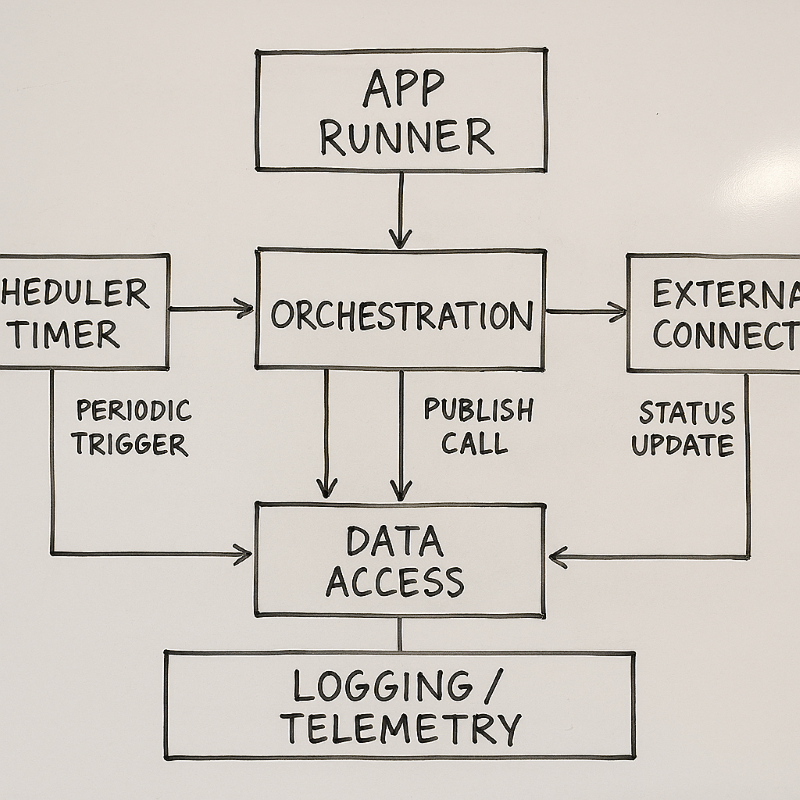
  • Greenfield: Scheduled post publisher
    • Build a new, small system end-to-end with tests from the start.
    • Define the domain and constraints yourself.
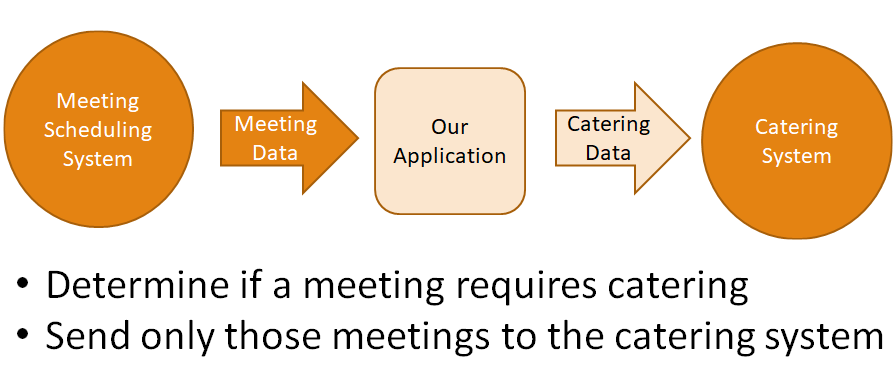
  • Brownfield: Meeting scheduling system
  • Choose by comfort level
    • Favor the option where you can focus on workflow discipline, not domain discovery.
DemoApplication.png

References

QR-TDDinTheAIEra-600x600.png